Posts

Understanding AWS service latency

Image
Understanding service latency is a critical aspect in designing and developing applications on AWS. In this blog we will look at the service latency and service limits of some of the commonly used data collection services in AWS.  Latency considerations for "Real time" data collection services: Amazon Kinesis Data Streams and Amazon SQS can be used for real time data collection. It is important to understand the limits of each of these service to determine how they fit in the application architecture. Amazon Data Streams limits – 1 MB/Sec or 1000 Messages/Sec Per Shard for Write. 2 MB/Sec Per Shard for Read for all consumers. 5 API calls /Sec Per Shard for Read for all Consumers. This means Amazon Data Streams have a latency of about 200ms. Go with Amazon Data Streams when you are looking for " real time " data at scale with low latency .  However remember that there is no auto scaling of shards in Amazon Kinesis Data Streams. You have to pre-calculate your sha...
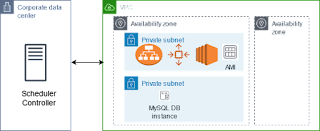
Job Scheduling on AWS - Part 2 - Extending on premise job scheduler to AWS

Image
This blog is the second in the series on Job scheduling in AWS. The first one focused on scheduling jobs using AWS native services. This blog focuses on an architecture to extend the on premise job scheduler to AWS.  (Link to the first blog - https://ideasforcloud.blogspot.com/2021/06/job-scheduling-on-aws.html) A common requirement when you have Hybrid infrastructure (On premise data center + AWS Cloud), is to have a single job scheduler  to schedule jobs on both the on premise and AWS Cloud environments. (Note - As I had indicated in the Part 1 blog, if your requirement is to source the data from an on premise data source, AWS Data Pipeline offers capabilities which helps you do that. You can install an AWS Data Pipeline Task Runner on your on premise server that can help manage your on premise data source).  Here are the steps you can follow to use your on premise scheduler to schedule jobs on AWS. I have outlined the steps for setting this on 1 AZ. However d...

Job Scheduling on AWS - Part 1 - Using AWS native services for job scheduling

Image
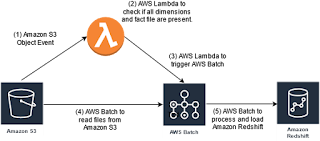
 In this blog, I will look at some of the ways to schedule and/or run job/batch-jobs in AWS using AWS native services. In Part 2 of the post, I will talk about how to extend your current on premise job schedule to AWS.  1)       Using AWS Lambda –               An AWS Lambda can be triggered via several ways. The most common way will be to trigger by a file upload to S3. Create your  AWS  Lambda function and set the trigger. Your trigger can be a file upload to S3. The moment a file is uploaded it executes the  AWS  Lambda which contains your execution code.                   Considerations for using  AWS  Lam bda – a.     When processing large files use AWS Lambda as a trigger rather than a file processor. For example - lets say your requirement is to load fact and dimension files into Amazon Redshift, and you are using A...

Evolution and What’s Next for AWS

AWS lists over 100 services today. The speed at which AWS has released these services and the number of enhancements to each of these services overtime is remarkable.  However, in my opinion, of all the service announcements and enhancements, three of them deserve special credit. These three played a pivotal role in popularizing Cloud and AWS, and helped catapult AWS to the top. 1)       Public launch of Amazon S3 in early 2006 2)       Public launch of Amazon EC2 in mid 2006 (Remember EC2-Classic) 3)        Amazon   EC2- Classic to  Amazon  EC2-VPC in 2013 (Many people I have spoken to think of AWS and Cloud, as the future; the new shiny object. I get a surprised look almost every time I tell people  Amazon  S3 and  Amazon  EC2 were introduced back in 2006; so AWS is not new). Compute and/or Storage are the backbone of software applications.  Amazon  S3 being ...

My tips for securing AWS Solution Architect Associate Certification

The benefits and the value of clearing an AWS certification is now well know. I often find myself answering these questions  - "How do I prepare for the AWS Solutions Architect Associate Certification? Where do I start? What should I focus on?" So here are my thoughts for preparing for the AWS Solutions Architect Associate Certification.  Note - Honestly, what you find here is no way exhaustive and might have some updates or even inaccuracies. The intent is to give you an idea on how to prepare and what to expect in  the exam. Please review the AWS exam material for the most up to date information. Amazon S3 - 1)       Go thru Amazon S3 and  Amazon  Glacier, different types of  Amazon  S3 and  Amazon  Glacier.  a.        Create a bucket and try upload and download of files. b.       Make your bucket and objects public and private. Notice the difference in...