Posts

AWS Instance Role and Instance Profile

 In this blog, let us try to understand what are Instance Profile and Instance Roles in AWS. An Instance profile is an identifier for an Amazon EC2 instance while an Instance Role defines what can the user (in this case the Amazon EC2 which assumes this role) accomplish. In some way, think of the Instance Profile as the designation – Architect, which the Instance Role defines the roles and responsibilities of the person who holds that designation. You may now be wondering, Why is this understanding and the distinction between these two important. The answer lies in how AWS services create these; or expects us to create these. If you have always used the AWS console to create the Instance Role, then there is a chance you may not know what an Instance Profile is, as the console automatically creates the Instance Profile too and gives it the same name as the name you used for the Instance Role. Now when you use the console to create and launch the Amazon EC2 attaching the role you...

Amazon Redshift and the “Low/Zero-Code - Low/Zero-ETL” narrative

Image
Amazon Redshift is a column-oriented, fully managed, petabyte-scale data warehouse that makes it easy and cost-effective to analyze all your data. It achieves efficient query performance through a combination of massively parallel processing, columnar data storage, data compression, and ML powered system optimizations.  In this blog let's look at how Amazon Redshift helps the “Low/Zero Code – Low/Zero-ETL” narrative.  Before we get started, let's first understand what ETL means and why we do ETL.  ETL stands for Extract, Transform and Load, and it means exactly what each of these terms sounds like. We Extract data from a source, Transform the data based on the need and Load it to a target. For example - You can use a Cobol program to Extract data from a GDG, Transform the data in a series of Cobol code and Load it into a DB2 table. Another example can be where you use an ETL tool such as Informatica or Talend to extract data from a table or a file, Transform the data and ...

5G: What does it mean to me?

Image
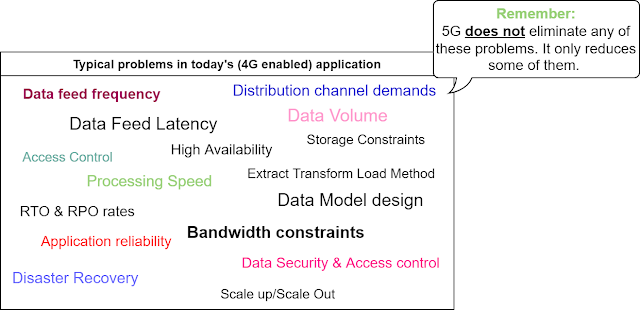
A lot of different things come to mind when I think of 5G. The capabilities it brings forth in terms of enhanced bandwidth, lower latency, higher speeds, higher reliability; the different 5G enabled services that Cloud providers have launched; and even the recent news about how air traffic can be affected by 5G, owing to the capabilities of 5G to handle radio bands of much broader frequency range compared to 4G; etc. The capabilities of 5G further takes me to think about specific use cases: Think of a hospital with thousands of connected health monitoring 5G enabled devices. The higher speeds and lower latency can help transmit the information collected by these devices to a processing unit which can all help take faster decisions to save lives. Think of an industrial machine shop using connected 5G enabled sensors which can detect variations in temperature, alignment of a drill bit, or any other change that can affect the machining operation. 5G capabilities of these sensors can hel...

Implementing AWS Outposts to solve real world problems

Image
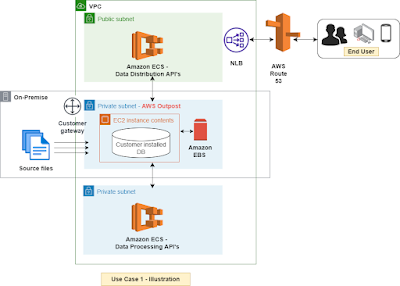
This blog is the second part in the series on AWS Outposts.  If you have not worked on AWS Outposts, I suggest read my previous blog where I have provided an overview of AWS Outposts.   As I have indicated in my previous blog, AWS Outposts is tailored made for scenarios such as local data storage, low latency processing and Hybrid Cloud use cases. In this blog let us look at how we can use AWS Outposts for solving some of these problems using 2 use cases.   Use Case 1 : Customer has a local data storage requirement i.e. No data at rest or no databases on Cloud.   Solution: Let us look at how we can setup a simple 3-tier architecture (consisting of a Presentation layer, an application layer and a data layer) using AWS Outposts and Cloud, to address this use case. Infrastructure setup - For the purpose of this blog, we will consider a simple AWS setup with 1 region and 1 AZ. Our VPC consists of 3 subnets, 2 private and 1 public. AWS Outposts sits on one of th...

A Practitioner’s view of AWS Outposts

Image
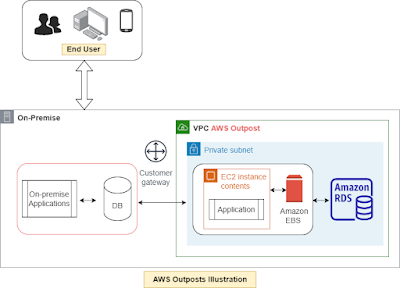
AWS Outposts is a managed service which helps run fully managed AWS services in your on-premise environment or at an AWS edge location. AWS Outposts are designed to help run your workloads and applications using familiar AWS services and API’s. To setup AWS Outposts, you have to choose from a standard predefined configuration of Compute and Storage based on their processing and computation needs. Think of AWS Outposts just like another subnet in your VPC; because AWS Outposts is just really that, a separate subnet. You will use the familiar AWS API’s and you will manage it using the same AWS console. The only difference is that AWS Outposts rack and servers will physically sit in your on-premise data center and you as the customer is responsible for the physical security of the AWS Outposts.  The AWS O utposts family include AWS Outposts Rack and AWS Outposts Servers . AWS Outposts Rack comes in a 42U form factor and provides AWS services such as compute, storage, databases and...

Understanding AWS service latency

Image
Understanding service latency is a critical aspect in designing and developing applications on AWS. In this blog we will look at the service latency and service limits of some of the commonly used data collection services in AWS.  Latency considerations for "Real time" data collection services: Amazon Kinesis Data Streams and Amazon SQS can be used for real time data collection. It is important to understand the limits of each of these service to determine how they fit in the application architecture. Amazon Data Streams limits – 1 MB/Sec or 1000 Messages/Sec Per Shard for Write. 2 MB/Sec Per Shard for Read for all consumers. 5 API calls /Sec Per Shard for Read for all Consumers. This means Amazon Data Streams have a latency of about 200ms. Go with Amazon Data Streams when you are looking for " real time " data at scale with low latency .  However remember that there is no auto scaling of shards in Amazon Kinesis Data Streams. You have to pre-calculate your sha...